About Me

My photo
A retired Welshman living in wonderful Plymouth in SW England, I’m a family man, novice sailor and boat builder, astrophotographer and motorhomer. With a passion for all things to do with education and the sea and skies above, I have a sense of adventure and innate curiosity. I write three blogs. ‘Arwen’s Meanderings’ charts my learning to sail a self-built John Welsford designed ‘Navigator’ yawl. Look out for her accompanying YouTube channel www.YouTube.com/c/plymouthwelshboy . ‘UnderSouthWestSkies’ follows my learning journey as I take up astronomy and astrophotography; a blog for beginner’s new to these hobbies, just like me. ‘Wherenexthun’, a co-written blog with my wife Maggie, shares how we ‘newbies’ get to grips with owning ‘Bryony’ an ‘Autosleeper’s Broadway EB’ motorhome, and explores our adventures traveling the UK and other parts of Europe. Come participate in one or more of our blogs. Drop us a comment, pass on a tip, share a photo. I look forward to meeting you. Take care now and have fun. Steve (and Maggie)

Sunday, 9 March 2025

Checklist - An equipment check list for a milky way astrophotography session

 As I get older, I get more absent minded and forgetful. I've lost the car a few times in various car parks. I've left the phone on the car roof and lost it! I once left my GoPro camera recording a night session and had to drive back and get it. Fortunately it was still dark, deserted and the GoPro was attached to a fence post and not immediately noticeable.

My real pet hates are when I forget to pack something I need. Last time I left the powertank behind and had to drive twenty minutes home to get it - having assembled the rig earlier only to discover that...... you get the picture. 

I've done something similar with the tripod as well! 

So, I use check lists. There are a few posts here showing my various checklists. It is a system which seems to have helped me enormously when I was dinghy cruising and expeditioning. 

So, without further ado, here is my milky way night session check list. Hope you find it useful. If I have missed off anything, drop me a comment below and I will add it in for all. 

Clear skies, take care, stay safe and have fun out there 

Steve 


And just in case you cant get the picture printed off - here it is in text below 

SWSA 2i gear


Text Box: Copyright: PlymouthAstroBoy
www.UnderSouthWestSkies.blogspot.comGeneral equipment  - safety

Tracker and base


Headtorch+ spare

WO base wedge+plastic shims


Penknife

Counterweight assembly+bar+one weight


Garmin InReach PLB

AA batteries


Charged smartphone

Large flat dovetail clamp


First Aid kit

Round dovetail clamp


Space blankets + Bivvy bags

MSM Z base


Hand warmers

Gorillapod joby ball head


Compass + Map

Polar scope illuminator


Driving and reading glasses

Camera connect cable


Insect spray

Green base plate


Fleece blanket

Right angled polar scope viewer


2 emergency red glow sticks

Kneeling mat


(Small bothy) (small beach shelter)

Benbo CF tripod


Clothing

Green laser adapter+pen


Waterproof

Camera Gear


Duvet coat

Canon 800D+dummy battery


Thermals

Lenses – Samyang 14mm, Canon 22mm+50mm


Hats and gloves – fingerless and over-gloves

GoPro Hero 9+batteries + tips book


Beanie/buff

Canon batteries -spares


Walking boots and thick socks

Cleaning kit + small tripod screw adapter thread


Whit flats ring + Bahtinov masks


Intervalometer + AAA batteries


Other

L bracket


Hot drinks/hot water

Dew band


Teabags/food/snacks

Small Joby Gorillapod tripod


(Trangia, fuel, matches)

Optolong L Pro + other filters


(Lightweight camping chair)

Spare memory cards


(camping mat, lightweight tent, sleeping bag)

Log/note book  + Pen


Reading book

Small handheld diffuse glow lamp


Samsung tablet for flats


Power


3 x power banks


Velcro cable ties - spares

Usb cables – C, micro and A


Small roll electrical and/or duct tape

Spare C2032/2025 disc batteries


Small masking tape strips card

Spare AA and AAA batteries


Small screwdriver/hex key tool kit


Car keys , wallet


Left emergency plan – location, routes, times


Saturday, 8 March 2025

Equipment - Making a DIY right angled viewfinder for a star tracker polar scope

Newly arrived to my blog? Want to know more about me before you dive into my posts? Why not visit the home page first and start your exploration from there: 

https://undersouthwestskies.blogspot.com/2025/01/welcome-to-my-new-astronomyastrophotogr.html

And welcome. Welcome to 'UnderSouthWest Skies'. Thanks for stopping by. I hope you find the experience worthwhile. This blog post has been written from my own 'beginner perspective' after doing lots of reading on the topic below.  In getting my head around it all, I may have got odd bits slightly wrong; but, like you, I am on a leaning journey, so please forgive any unintentional errors.  Meanwhile, clear skies to you. Take care and thanks for visiting   Steve aka PlymouthAstroBoy 


Finally, I have got around to making a right angled polar scope viewfinder. The cost of them is around £80 mark with postage, here in the UK. I had an old pentax DSLR right angled view finder and I was sure I could 'adapt' it. Now there is an issue in that this old one mirror flips everything horizontally....but more of that little quirk later in the post. 

I've wanted one of these right angled viewers for quite some time. I find it increasingly difficult to bend down and look up through the central polar scope of my skywatcher star adventurer tracker (same for my Ioptron sky tracker as well).  There isn't an astrophotographer alive who uses a star tracker who doesn't understand this issue. Here at a latitude of 50N - the tilt of the tracker is such that when the polar scope is inserted, you are on your knees with your back arched to look up through it. If you can do that! When I'm on my knees below it, my eye is around 14" away from the viewfinder - rendering it useless! If I try to get underneath it and closer, I invariably end up knocking the tripod and then struggling to get back off my knees - very frustrating! 

When doing DSO astrophotography and using my ASIair mini - then there is no problem if I am slightly out in the initial polar alignment as the ASIair helps me correct it quickly. But when doing milky way astrophotography - then a right angled viewing gizmo is going to be very helpful indeed. 

So what stuff did I use?

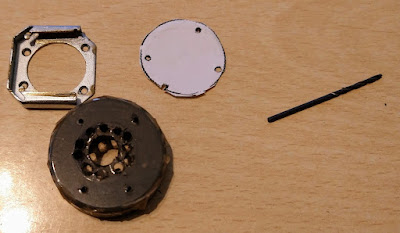
  • an old pentax right angled DSLR viewer
  • electrical tape
  • an old polar scope cover piece I had knocking about
  • some very tiny phillips screws 
(I should at this point just explain for those not in the know, that a polar scope is essential to getting good alignment with the stars so that the camera tracks their movement above and trailing stars is avoided. This involves aligning the tracker with the north star Polaris. The bigger the lens you use, the more accurate you have to be in your alignment processes - otherwise you will have horrible trailing and photos that cannot be stacked together in any available software.)


I removed the metal silver viewfinder frame off my ebay purchase by undoing the four tiny screws and then took the protective cover lid off the polar scope. Using the silver viewfinder slot as a template I then marked out drill holes and also a central large hole to be cut out.


Ten minutes judicious use of my multi-tool with drill and then sander bits and hey presto - the protective lid had been cut out. It was then just a matter of screwing the lid back onto the DSLR viewfinder and then doing a few trial fits. 


It proved to be a little loose but a thin strip of duct tape on half of the lid lip - turned it to a fairly snug push-on fit. 

Does it work?  OF COURSE IT DOES! 😁
I have genuinely surprised myself - no more wet knees, cricked neck or wrecked back muscles. 


And it works on the star adventurer too.

So what about the flipping issue? 

Ok, how best to describe this? For some reason, the right angled viewer mirror flips the view of the polar scope reticules. So, 3 o'clock is at the 9 o'clock position and obviously, 9 o'clock switches over to the 3 o'clock position.

What does this mean in reality? Well when positioning Polaris on the correct place in the inner circle of the reticule using a polar alignment app to help determine its position - if Polaris is shown at the 5 o'clock position on the app, on my reticule, when using the polar scope, it will have to be placed at the 7 o'clock position instead.  It takes a minute or two to get your head around it - think mirror flip of the reticule along the vertical axis. 

It may sound confusing but in reality is quick and simple to work out; as long as I remember!! 

I spent around £2 in all instead of £80 so I am happy and I have reused/recycled something to boot. 

With plastic 3D printers etc - I am sure there is a free template for making the bit which fixes a viewfinder to the polar scope on the tracker. 

I found this Sky at night article which gives a better overview on how to do it than I have above 


Sunday, 23 February 2025

Tutorial - using Sequator

 How I have been using Sequator thus far in my astrophotography learning journey

Around two years in now to learning, from scratch, i.e. no knowledge base whatsoever, how to

·        Use my DSLR in manual mode

·        Do some basic astronomy using a beginner’s telescope

·        Complete some basic astrophotography – both deep space targets and milky way landscapes

One of the free software programs I got to grips with early on was Sequator – mainly for stacking my very limited milky way landscape images. Below I outline my Sequator work flow.

Remember, this blog is written by a complete beginner to astronomy and astrophotography – for other complete beginners! Essentially it is a record of my learning journey in these fields. Mistakes, warts and all!

I am doing this post on Sequator today because some one emailed me and asked if I had any basic workflow notes for a complete beginner. They had been looking at my ‘Beginner’s guide to taking your first milky way photograph’ series; in one blog post I mentioned my using Sequator but didn’t expand on it. Luke, this post is for you buddy.


Firstly, lets start with – What is Sequator?

It is a free, at the moment, software for windows platforms. It stacks and aligns RAW or TIFF file night sky images, and in doing so removes random noise. An added advantage? It handles images with a little bit of foreground in them. All the better then! And, bonus, it will help with other challenges such as light pollution, distortion, hot pixels, etc. I found the basic functions quick and easy to learn, understand and set up ad I have put my workflow notes on sequator further down this post. Remember, I am a very new beginner astrophotographer. So, I am sure I have missed things out, for which I apologise. But the aim of this post is to give you something to work with initially if it is the first time you have come across Sequator.

As well as light images, you can add darks and flats as well. The basic settings for processing the images are straight forward. There are other options that can be selected depending on the images being stacked and these are explained in the manual which can be viewed here: https://sites.google.com/view/sequator/manual


Here then is my beginner’s workflow using sequator:

1.       Sometimes, not always, I may batch edit my lights before placing into sequator – using affinity photo – NOTE: only edit exposure, contrast, highlights, shadows, and WB – I am aiming to try and reveal further detail from shadow areas and prevent blowing out of brighter stars -  if you do this, save them as TIFF files at end

2.       Open ‘Star Images’ – drag and drop light images into sequator (SQ) NOTE: star frames = lights; noise images = darks – use same number of these as lights added – at least 5 - 8; vignetting images = flats

This is one of around 15 images I collected on the night
ISO 3200 f/2.8  11"
I have blocked out the number plate for obvious reasons


3.       Check ‘output’ box and name file – save as Tiff 16 bit file

4.       SQ automatically selects image as base image – double click base image to choose image I want.

5.       Composition – ‘align stars’ for all images with foreground or just milky way and/or stars. (If doing star trails – select ‘trails’ instead). On Accumulation’ – select ‘best pixels’ – slider across to HIGH – this will remove satellite and plane trails from final image

6.       Click ‘freeze foreground’ (bottom LHS) if images contain foreground elements. Check box ‘selective’ alongside. Slider across to ‘strict’. Select ‘best pixels’


7.       Sky region – allows you to help Sequator decide which part of the image is sky and which part is foreground.  Use ‘boundary line’ if you have a flat non punctuated horizon line between sky and foreground. Use ‘irregular mask’ for complicated horizon or foreground objects punctuating it. Mouse scroll wheel will green paint in sky area. Leave little gap between foreground and sky that has been blanked out. (Right mouse click = eraser for mistakes). Click ‘auxiliary highlight’.

8.       Auto brightness – off. HDR – off (although try as on if different exposure levels between images – if final image is over exposed – redo and check both these to on) ‘Remove dynamic noise’ – on. It removes hot pixels – especially useful if images are long exposure ones. If not using dark images – reduce distortion effects – I keep on ‘auto’ as it seems to remove any star streaking in the outer edges and corners of my final stacked image.

9.       Check ‘light pollution’ – only if present in images. Check ‘uneven’ or ‘deep sky’ – depending on conditions. Don’t apply light pollution too aggressively. I find it gives horrible results and so unless there is major light pollution – I don’t use it.


10.   Can check ‘intelligently aggressive’ box or leave unchecked an use slider to determine how much light pollution compensation to apply. Default – check the box.

11.   Check ‘reduce distortion effects’ box to auto. Check ‘complex’ box at bottom

12.   Ignore rest of boxes on menu

13.   Click ‘start’

14.   On final image – zoom in and check any areas with trees etc for stacking artefacts etc.


Around seven minutes processing to this, the final stacked image, saved as a TIFF file and ready to import into Affinity Photo for further processing work 

In Affinity Photo, I do some post editing work on the final TIFF image from Sequator. Post editing skills development is a focus on mine for 2025. Why? Because I really suck at it! 😭

Anyway, from the image above via the images below: 


and finally ending up with this: 

Best I can do with my current limited post editing skills and knowledge of Affinity Photo tools and workflow practices. Ho Hum! Not Bad for a first effort I guess. 


Sequator can be used for star trails as well. I haven’t done any star trail work yet but if you are interested here are two websites that give tips:

Star trails in sequator

https://www.skyatnightmagazine.com/astrophotography/star-trails-software-sequator

stacking milky way images in sequator

https://www.ntounas.gr/how-to-stack-milky-way-photos-using-sequator/


Two videos about Sequator that I found useful were:


As always, I hope this has been helpful if you are a beginner. If I have anything wrong or if you can offer some better tips, then please drop me a comment below so that I can update the post.

As always, dark skies to you all, stay safe and take care out there. Have fun

Steve 

Saturday, 22 February 2025

Beginners guide to taking your first milky way image - 6 getting a milky way 'selfie'

 How to take your first milky way ‘selfie’

An aim for this year; to get a decent milky way selfie!  

Below are the selfies I took last year. All of them can be significantly improved upon.

So, what have I been doing? What do I need to do to raise my game further this year?

This is post 6 in my blog series ‘Beginner’s guide to taking your first milky way photograph’ – a series in which I share my learning journey thus far towards this aim. As always, please remember I am writing as a complete beginner to astrophotography and the sole rationale for my entire blog is one of helping beginners (like me) make some rapid ‘basic skills’ progress in their astronomy and astrophotography knowledge.

My first effort at a milky way selfie taken at Mesa Verde Lodge in USA
In the car park  battling with stray car headlights and random security lighting coming on and off 
This was a single exposure 


What equipment do I use to obtain a milky way selfie?

·        Canon 800D DSLR

·        Samyang 14mm f/2.8 or Canon 22mm f/2.8 lenses – affordable, sharpish, wide angle lenses basically

·        Tripod

·        Intervalometer (although I am thinking of getting a remote shutter release at some stage this year)

Previous posts will give you tips about planning for milky way photography, additional equipment needs and basic camera and base astro settings. But, here I will stress a couple of things I discovered last year.

For a good selfie, you need a dark sky location.

Secondly, if you are doing a silhouette composition, you will need to find a location where you are higher than your camera i.e. you are shooting upwards slightly so you are silhouetted against the milky way. You can also use a light source such as a light orb, headtorch or adjustable LED panel as well.

Your image composition should tell a story - see my previous post on composition tips. If I am doing a ‘headtorch looking up to milky way shot’ I shoot in portrait. If I am using an orb to light some of the landscape around me – I shoot in horizontal.  

To get a sharp silhouette or image of myself, I am to make my self smaller in the frame by either going away some distance from my lens or by using a very wide-angle lens which will make me look smaller in the frame. In either case I am trying to be not further than 8 – 12m maximum from my camera.

I found focusing your camera for a selfie shot to be tricky. I have given tips on focusing at night in a previous post on camera settings. For now, I’d suggest you either focus on the sky itself (infinity) and you stand somewhere as close to the hyperfocal distance as you can. Alternatively, I an focus on myself – I mark where I am going to stand, return to my camera and then focus on that marker.

Of course, the issue about a selfie is simply this – how long can you stand still for? How hard is it to stand still during the exposure? If you are holding a lighting orb? Or when there is a slight chilly wind blowing? Practice getting a comfortable pose. I found that breathing out very slowly when taking the exposure helped enormously. Alyn Wallace in one of his videos I have embedded below recommends a sitting pose if you find standing for any length of time difficult.


Taken down the Roseland peninsula in Cornwall at Treveague Farm
Another single exposure but one where I held the light orb for too long so that it completely washed out the motorhome 

What camera settings do I use?

·        Manual mode

·        RAW

·        Lens focusing – manual

·        No light pollution 1600/3200 ISO; light pollution then 800/1600

·        Not using star tracker – then shutter speed 10 – 20” depending on 300 rule and lens focal length with aperture f/2.8;

·        Doing two images – tracking and stacking sky – f/4.0, ISO 800, 30” shutter speed; combined with a blue hour foreground exposure with me in it, experimenting with shutter speed, aperture and ISO settings  

·        I tend to do test shots irrespective of whether single or tracked or stacked exposures – checking against histogram

How do I take the photo if I am standing in the scene?

You will need a remote shutter release, or an intervalometer, or use your camera’s internal shutter release timer.

Again, the videos below give plenty of tips but this is how I do it. I use an intervalometer on which I set a delay – that’s the time period I have to get into my location and pose. I also have my camera’s 10” delay setting switched on. This means once I am in position, the 10” delay on the camera will then kick in – I can see a red flashing light or hear a bleep when that happens – this is when I firm up my pose!  I then mentally count down my exposure time in my head and then add another 10” on top of that before I finally move out of pose.

Single exposure with illumination from my smartphone
Milky Way at Wembury Beach


Did this work last year?

Yes…..and no……!  So what am I going to do differently this year? Not sure yet is my answer. I will start with what I did last year and then try something different. Rome wasn’t built in a day. I am expecting lots of duff shots but that is part of the fun. I tried single exposures, so maybe try and perfect this a little more and do some stacked/tracked/blended shots this year as well. 

If I make any changes to the above approach, I will add a postscript update below.

How much didn't go well in this effort? Where do we start? 😭

Well, I tried although Lord knows why! 😆

In the meantime, if you have any better tips and approaches, then why not share them in a comment below so that future post readers can learn from your experiences too

Dark, clear skies, stay safe, enjoy the forthcoming return of the milky way to our northern skies

Steve

 The videos below helped me on my first steps to taking a milky way selfie