Home page: welcome - who am I - blog aims - blog navigation tips

Saturday, 19 July 2025

Imaging tutorial: Beginner's guide to using a DSLR camera and/or GoPro for taking star trail photographs

 Blogger isn't always the most intuitive platform to navigate - but it is free and simple to use and manage. 

To help you find information quickly on this blog, you can


The Weather has been pants hasn't it. Everytime there has been a clear night recently, it has always coincided with a full moon; or I have had other pressing family commitments and so haven't been able to get out at night. 

So I am severely curtailing my ambitions for my landscape astrophotography over the next few months. What I would like to walk away with at the end of October is the following:

  • a circular star trail landscape photograph of my local church
  • similar photo of Windy Cross (A Granite cross and little leat waterfall) on Dartmoor 
  • a star trail photo of Rame Head chapel
On the milky way landscape photo front, my ambitions are to obtain by end of October:

  • Dartmouth Day mark 
  • Start Point Lighthouse
  • Rame Head chapel
  • Wembury Church
  • The Great Mewstone at Wembury Point 
  • a better image of Bigbury Island under the milky way alongside one of the huge beach tractor as well
So, to the focus of this blog post. Star trails on a DSLR and/or GoPro. 

Funds are tight. I cannot afford another DSLR body at the moment. My two other cameras are a GoPro Hero 9 and a Sony HX-90 digital compact.  I think the trails will be easier to do on the GoPro, but I am open to that belief being challenged. 

alt="star trail above Wheal Owles by Simon Torr"
Copyright: Wheal Owles by Simon Torr


So, here are my tips for using your DSLR to gain star trail images:

*source of some information: Peter Zelinka Star Trails tutorial
** I haven't yet shot any star trail images so these are my PLANNED INTENDED settings for future shoots 

Firstly equipment! You will need:
  • DSLR
  • dummy battery and power bank OR several spare batteries
  • Stable tripod with good ball head
  • Intervalometer
  • wide angle lens - in my case my samyang 14mm. If you want curves - try a 24mm lens, for lines, try 50mm
  • Fast SD card - you will need a class 10 UHS class 3 memory card, minimum 32gb - better 64gb

    Secondly, what settings do we use? 
    1. apply the 300 rule and go for 90% sky coverage in your landscape photo 
    2. do one foreground shot at the start or end of your session - so that you can merge it with your stacked star trails in post editing
    3. settings:  ISO 1600+ to get lots of stars and dense bright trails; ISO 100 - 800 to get fewer stars and bigger gaps between individual trails with better star colours. In an urban sky - try ISO 400 to 800 at F/4 to F/5.6
    4. If light conditions are too bright - reduce ISO and open up the aperture - try F/4
    5. shutter speeds - 20 to 30". However, if you use a very low ISO you can increase your shutter speed to 60", 120" or even 180", capturing more light, a cleaner image with less noise and grain. 
    6. White balance 3000 - 5200K. I will be probably starting at 3600K. Don't use 'auto'
    7. LNR off
    8. use an intervalometer. Here it gets tricky. You will either use a 1" delay between your shots or the length of your shutter speed + 1" more. And you need to experiment first before you go out for the night. Peter Zelinka's tutorial really explains it well and you can access it here https://www.peterzelinka.com/startrails
    9. I set my intervalometer to take around 3 hrs worth of shots minimum, but that's just me. 
    10. set your DSLR to evaluative metering
    11. Direction - face north = circles; S = downward arcs; E or W = upward arcs


    So what about settings for your GoPro? Mine is a Hero 9

    • Night Lapse mode
    • FOV - wide
    • shutter speed 30" - if in urban environments - then shorten it
    • Interval - auto
    • ISO 100 - 200 (or 100 min to 800 max)
    • If using Protunes - Flat colour and WB of 4000 - 5500K
    • shoot in RAW images
    • collect 3 - 5 hrs worth of images
    Equipment: 
    • stable tripod
    • spare batteries and/or powerbank and cable
    • GoPro camera


    Above is an outline of how I go about getting my star trail images. The next step is how to post edit them ad for that I use a program called Starstax.  Having not yet taken any star trails, I won't go into using StarStax until I have used it myself. 

    Postscript update:

    How am I progressing with star trail imagery?  

    I think fair to say, not as well as I might have hoped. 

    Here is my first ever star trail shot taken on a motorhome site in Dubrovnik in October 2025

    alt="Star Trails above motorhome on campsite at Dubrovnik"

    So, what's gone wrong?

    1. I was shooting on a night with a huge amount of light pollution - bright campsite lighting, rising full moon and light aura from nearby port
    2. motorhomes constantly coming and going on the site caused headlight and red brake light reflections in the clouds above 
    3. wrong settings in camera - ISO was too high at 800
    4. poor processing in starStax - first time I have used it; ditto in Affinity Photo.
    Next time: 

    1. ensure there is no light pollution
    2. choose better settings on camera particular ISO, shutter speed and interval between shots 

    Have you got a star trails shot to share with us? Have you got any tips to help us take better star trail photos? What can we do to combat light pollution when doing star trails? 

    If so drop us a comment in the box below. 

    Until next time, clear skies, have fun and take care out there. 


    Tuesday, 15 July 2025

    Imaging session - IC1396 and the Elephant Trunk's nebula.

     Blogger isn't always the most intuitive platform to navigate - but it is free and simple to use and manage. 

    To help you find information quickly on this blog, you can


    This is my first attempt at IC 1396, a large emission nebula which is a region of ionized gas that glows due to the energy from nearby stars, particularly a very bright, massive star (HD 206267).

    It is two nights worth of data as outlined below taken over two nights when there was a full moon, so to be honest I am pleasantly surprised that anything showed up at all!

    alt="Zenithstar 61 ii rig set up"

    alt="Image of full moon on rear screen of Canon 800D DSLR"

    IC 1396 has a magnitude of 3.5 and is in the constellation Cepheus, approximately 2,400 light-years away from Earth; a vast and complex area. Its most prominent feature is the Elephant's Trunk Nebula (IC1396A), a concentration of interstellar gas and dust forming a dark, finger-like structure. The entire IC1396 nebula spans over 3 degrees and has a near hollow and gas-poor interior and a complex of dark nebulae threaded throughout the perimeter. Many of the dust structures are aligned so they appear to radiate away from the stars in the nebula’s core.

    Look for the reddish star which is Mu Cephei, also known as Herschel’s Garnet Star. The tenth brightest star in the constellation Cepheus, with an average apparent brightness of 4.08, it has a radius 1,260–1,650 times that of the Sun and is one of the biggest stars ever discovered; situated at a distance of about 2,840 light-years from Earth.

    IC 1396A, better known as the Elephant Trunk Nebula, is a dark nebula formed by an irregular pillar of dust many light-years long. Pressure from bright stars in the core blows dust from that area leaving behind a darker region at the centre of the nebula while compressing dust around the edges, which drives new star formation. As a result, up to 250 young stars- all less than 100,000 years old, have been detected in infrared images taken of the Trunk region. The Trunk itself is about 20 light-years long. It is the first image in which I have ever captured a strong star formation area of the heavens above.

    Imaging equipment used:  Canon 800D DSLR, Zenithstar 61ii refractor scope, EQM-35-Pro mount and guiding with ASIair mini, RVO 32mm guide scope and ZWO 120mm mini guide cam.

    Data acquisition: two nights of same data collection – ISO1600, lights 25 x 300”, 10 darks, 10 biases and 15 flat frames. Full moon at 96%+ on each night. Location – two different sites in Cornwall.

    alt="Astrophotography rig under red torch light"

    alt="Astrophotography rig being used on motorhome campsite"

    So, what do I think about the images?

    They were quite hard to process. I use SIRIL, GraXpert and Affinity Photo and somewhere along the way I tend to over saturate the colours and incorrectly process the background sky. I have overstretched the images resulting in star over-bloating as well. So, these are very much a first effort.

    Am I pleased with them? Yes. Sort of. I am pleased I captured the data on very bright moonlit nights from two separate locations. The post editing? Well, as always, it is a work in progress isn’t it. 

    Report card?  Considerable effort, showing some good acquisition skills but clearly more focus required in post editing! B+

    alt="The Elephant's Trunk Nebula"
    These are the minimally processed first effort images 

    alt="Close up of Elephant's trunk nebula taken with dslr and small refractor"


    alt="IC1396 The Elephant's Trunk Nebula"
    First effort 'over-cooked' images
    So a third effort will be necessary over the next few days

    alt="The Elephan's Trunk Nebula by PlymouthAstroBoy"

    What do you think I could do to improve the processing further? Let me know in the comment box below. Thanks 

    My most recent re-edits.....progress is slow! 😅

    alt="Re-editing IC1396 image"

    alt="The Elephant's Trunk Nebula IC1396A"


    Tuesday, 8 July 2025

    Imaging session - IC 1318 The Sadr region

     Blogger isn't always the most intuitive platform to navigate - but it is free and simple to use and manage. 

    To help you find information quickly on this blog, you can


    The Sadr region, known as IC 1318 or the Gamma Cygni Nebula, is a diffuse emission nebula that surrounds the star Sadr.  Around 5000 light years away from Earth, the area also includes the Crescent Nebula (NGC 6888) and The Butterfly Nebula as well - which is really IC 1318. You can see a dark thin dust alley and then two glowing cosmic wings either side of it - hence 'The butterfly'. 

    The nebulas glow comes from nearby stars releasing streams of charged particles known as stellar winds; these ionise the gases causing them to emit light. 

    Sadr is a yellow-white supergiant with x12 the mass of our sun and x 150 its radius. It lies at the centre of this stunning Hydrogen II emission region. 

    So, acquisition details? 

    This is the result of two nights worth of data, processed in SIRIL and Affinity Photo. 

    Equipment used: 

    • Astro-modded Canon 800D
    • Samyang 135mm F/2.8 lens
    • EQM-35-Pro mount
    • ASIair mini with RVO 32mm guide scope and ZWO 120mm mini guide cam
    • Optolong L-enHance filter clip in eos
    Acquisition times:  on each night 

    • 35 x 240" subs
    • 10 darks
    • 10 biases
    • 20 flats 
    I find post editing difficult. There is so much to learn and I am never sure whether I am getting the final image right in terms of tone and look at the end of it all! 

    But, here are my three attempts thus far in the order I did them: 

    alt="IC 1318 in the Sadr region"
    So, this one is fairly good. I like it but I felt I could have done a slightly more aggressive black point adjustment to get the background sky darker; taking care not to blow out the stars

    alt="More intensive colours in IC 1318"
    😧From one extreme to another. Second go and I overcooked it - too much saturation, vibrance and contrast. Back to the drawing board! 

    alt="Reduced star intensity image of sadr region, IC 1318"
    And my third effort - a halfway house. Better sky, better colours, not oversaturated but lost the stars! 
    Have I ever told you this post editing alarkey is hard work? 

    Postscript:

    I have downloaded and been using Siril 1.4 with Veralux hypermetric Stretching. I have also reworked my workflow to include some of the Seti Astro Cosmic Clarity Suite Pro. 

    So here is exactly the same data used above - here is the new image: 


    Which of the images above do you prefer and why? Have you used the new python script Veralux Hypermetric Stretch - what did you think of it? 

    As always, drop me a comment below with your views, tips, observations for further discussion. 

    Clear skies, stay safe out there and have loads of fun.

    Steve 


    Monday, 30 June 2025

    Technique tutorial: Beginner's guide to taking calibration frames in Astrophotography

     Blogger isn't always the most intuitive platform to navigate - but it is free and simple to use and manage. 

    To help you find information quickly on this blog, you can


    When I first started out in astrophotography, there was a lot to get my head around – how to use my DSLR on manual; how to use my kit lenses, what additional gear to get; even how to focus in the dark!

    My first images were stacked in Deepskystacker and when the results emerged – dust spots, red pixels, and ‘darker’ patches were scattered across the image. Very disappointing. Hardly surprising really. I hadn’t come across the term ‘calibration frames’ then. Now I have and I fully realise their importance in obtaining great astrophotography images.

    So, what are these ‘calibration frames’ and what do they do that is so important? 

    The frames are additional sets of images taken at the start, part way through or end of our astrophotography session. They are the quiet heroes that ensure our celestial photographs are not only bneautiful but also accurate. Simply put, when we poiuntr our cameras at the night sky, its not just starlighyt we are capturing. We also collect the imperfections of opur camera equipment - dust, noise, vignetting. Calibration frames help clean up our final images by removing or correcting these known defects or inconsistencies on our camera sensor; cleaning up our data before we start stretching and post editing it. Thinkl of them like this. Astrophotography is like painting a masterpiece but our brush is our camera sensor and it has smudges, and opur canvas, the night sky uimage, is unevenly lit. Calibration frames act like cleaning cloths and leveling tools, restoring clarity before we finish the image and start admiring it. 

    I take three types of calibration frames. Each one has a specific role to play in improving the quality of my final stacked image. The types are:

    Dark Frames

    Biases Frames

    Flat frames

    But before getting into the specifics, lets remind ourselves of the other type of frames – lights!

    Light frames are the main images we take of our deep sky or milky way sky objects. Rich in signal from our intended target, they will often contain amounts of the dreaded ‘noise’. Then there may be aberrations, vignetting, hot pixels, plane and satellite trails; not forgetting sensor irregularities, read noise, uneven light gradients, dust motes and more. Basically then, all the stuff that needs to be removed or corrected within them.  Our light frames are straightforward enough to capture aren’t they. We select our deep space object, align our lens towards it, set our ISO or gain and correct our focus, before taking multiple images for stacking later.

    So, why is taking calibration frames as well such an important thing to do?

    Dark Frames tackle thermal sensor noise. Heat produced by our camera creates thermal noise (speckles) and hot pixels. A dark frame photo is taken with the lens or telescope cap on so that no light can get into the imaging train. Same exposure time, ISO/gain and temperature as our light frames. All we capture is the noise! Having identified this noise, we can now use the frame to eliminate or ‘subtract’ this unwanted data from our stacked data. No more or severely reduced hot pixels, thermal noise patterns etc. 

    A dark frame from my astro-modded Canon 800D

    We can build a library of darks frames – for different exposure times – and reuse them; if you are using a dedicated cooled astro cam. However, I mainly focus on use of DSLR on this blog and here it is trickier to build such a library. This is because dark frames also depend on the ambient temperature changes encountered from one imaging session to the next. Keep our DSLR either on or off our scope when taking dark frames. I just put my lens/telescope dust cap back on and continue shooting using the same exact settings as my light frames! It takes longer in the field but I don’t mind being out under the stars! One tip for taking darks with a DSLR is to ensure that no stray light can enter the sensor area, so I block off my eyepiece viewfinder with tape. A friend puts a small, lightweight, dark coloured fleece blanket over her rig when taking them. Now that’s dedication!

    So, how many dark frames should we take? How long is a piece of string? Reading around, between 10 – 20 seems the norm. I’ve seen some astronomy sites recommend between 20 – 30, arguing the more the better for obtaining a clean image. The key bit – DO NOT wait until the following night to take your darks. We take them on the night we are shooting. Remember same or as close as temperature to when we shoot our light frames.


    A Bias frame on my astro-modded Canon 800D

    Bias frames capture 'read noise'; the electronic ‘pattern’ (tiny electrical 'offset') and ‘read’ noise generated when the sensor reads the data and the camera downloads an image. Its like measuring your camera's natural hum when its sitting quietly.  We set our camera to the fastest shutter speed it can do – in my case 1/4000”, keep the cap on the lens/telescope and keep the ISO the same as our lights. The result is a map of your sensor's internal noise pattern. Take the stray light prevention measures outlined above when doing dark frames. Stacking these with our light images will help correct ‘fixed pattern’ noise and remove unwanted artifacts from dark and light frames. The image is 'subtracted' from yo9ur actual light image and so the constant buzz is removed. You are muting the background static to allow the true music of the stars to come through clearly. 

    How many? 20 – 50 seem the consensus needed to ensure accurate calibration.


    Flat frames correct uneven illumination  - vignetting, dust motes or shadows, on our sensor thus ensuring a smooth background in our final images. There are a number of different methods for taking flat frames and you can go research these to find which is best for your set up, but here is what I do:

    I cut out part of a clean white T shirt and stretch it between a small embroidery hoop that is just a slightly larger diameter than my Samyang 135mm lens and Zenithstar 61 ii aperture. I then place it over the aperture of my lens/telescope and then place a small tablet over the top of this. It has an ‘evenly lit’ white screen. Keeping my camera and telescope/lens in the same set up as my light frames i.e. no changes to focus, ISO or imaging train etc, I change my DSLR to AV mode and then take short exposures, avoiding any clipping of the histogram. I am aiming to have the histogram about a third or half way across from the left-hand side. I cannot emphasis this point enough – we must NOT change our imaging train or shooting circumstances. So, no changes to camera rotation, focus, ISO etc.

    Adding flat frames into the stacking of our images helps correct vignetting, dust shadows etc. They reveal how your equipment 'shades' light, allowing software to correct the image so brightness is consistent across the field. They are one of the easiest ways of boosting our final image quality and should therefore not be missed out.

    A flat frame taken on my astro-modded Canon 800D. The file has been reduced in size slightly for upload to the blog. 

    How many do I take? Normally around 10 – 20 flat frames. I take mine at the end of my imaging session after my darks and bias frames.

    Some quick clarification by the way  – vignetting is the light fall off towards the outside of your light frame. It might resemble a dark circle.


    I tend to use SIRIL, Affinity Photo, Deepskystacker and Sequator for post editing my astro images and each has a calibration phase when you add your calibration frames into the stack with your lights. The software then applies the various corrections before any alignment and integration. Clever software!

    Essentially what seems to happen is that bias frames are combined to create a master average bias frame. This is then subtracted from the dark frames to remove bias noise. Flat frames are calibrated and then either the master bias or the master dark frame is subtracted from flat frames. Calibrated flats form a master flat frame. The master dark is subtracted from our lights.  Everything is then aligned and stacked. Probably an oversimplification of the process.

    So,  should we skip doing any of them? You will hear, see, read that people do!  All I can say is I don’t. For me they are the difference between a clean astro image and one with those distracting artefacts in them.  Do I keep a library of them as a DSLR user? No! Why? I’m constantly switching lenses and telescopes. There are temperature and humidity variations from night to night. I suspect there is dust on some of my optics. Adjustments to ISO, exposure time, focus. Camera rotation to get best framing of my DSO target. The list is endless isn’t it. 

    In conclusion – I hope this simple overview helps you understand calibration frames better. They are foundational to our astro imaging post processing work. Without them, our cosmic portraits are like listening to a symphony through a dirty speaker - we can hear the melody but distortion maks the finer notes. Used correctly we can remove/reduce noise, aberrations, vignetting and produce higher quality finished images. Calibration ensures the scientific and asethetic integrity of our images. We increase our chances of gaining sharp, clean vistas of nebulae and galaxies. The invisible polish that turns a night of data into a window on the universe. 

    Most free programs I use do it all for me, so I just need to ensure that I have taken my time and care over capturing my calibration frames correctly.

    Good luck in capturing yours.

    The final image after stacking the lights and the calibration frames 


    Imaging session - Noctilucent clouds

    Blogger isn't always the most intuitive platform to navigate - but it is free and simple to use and manage. 

    To help you find information quickly on this blog, you can


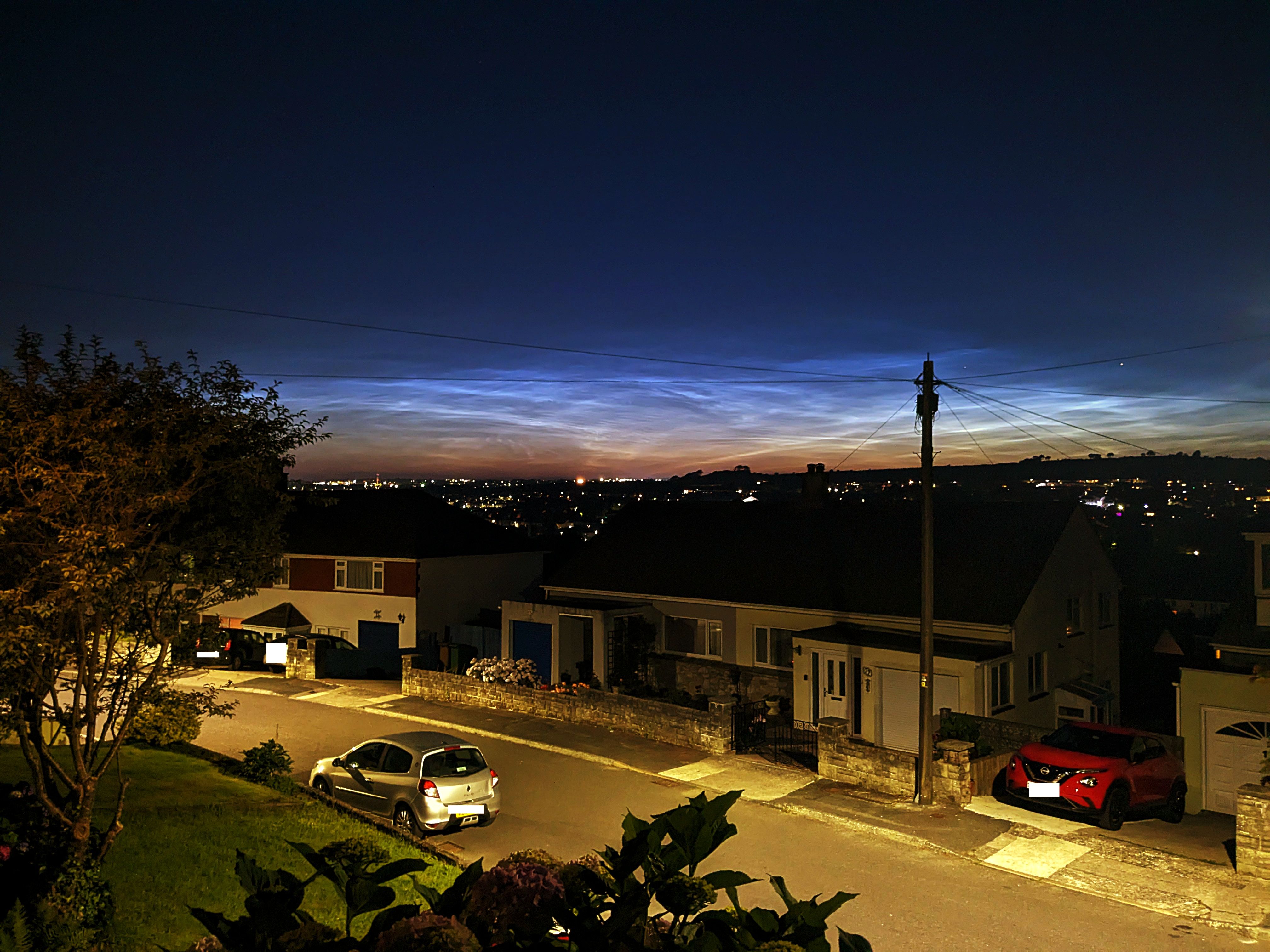
    Finally, I have seen my first ever noctilucent clouds, and all from the comfort of my own front step.  11.40pm looking to the north west. The light pollution from the northern part of the city dimmed their glow slightly but I am still thrilled. They are stunning to see. 

    Formed around 80 km above the Earth's surface in the mesosphere, tiny, minute ice crystals form around cosmic dust at temperatures around -140 C. 

    These photographs were taken quickly on my smartphone so they are the best but even so, I'm one happy soul! 

    alt="Noctilucent clouds over Plymouth"

    alt="Noctilucent clouds over Plymouth"

    alt="Noctilucent clouds over Plymouth"

    alt="Noctilucent clouds over Plymouth"

    alt="Noctilucent clouds over Plymouth"

    alt="Noctilucent clouds over Plymouth"